
![A modern video player interface on a soft blue background, split into two side-by-side video frames comparing subtitles and closed captions. On the left side, simple text at the bottom reads "Do you have the latest quarterly reports?" over a cinematic scene of two women in business attire conversing. On the right side, the same scene includes expanded closed captions reading "[SARAH] Yes, I have them ready for review," accompanied by visual accessibility icons around the frame for music, audio/speaker, and a ringing phone.](https://captionideashub.com/wp-content/uploads/2026/08/Gemini_Generated_Image_76nsok76nsok76ns.webp)
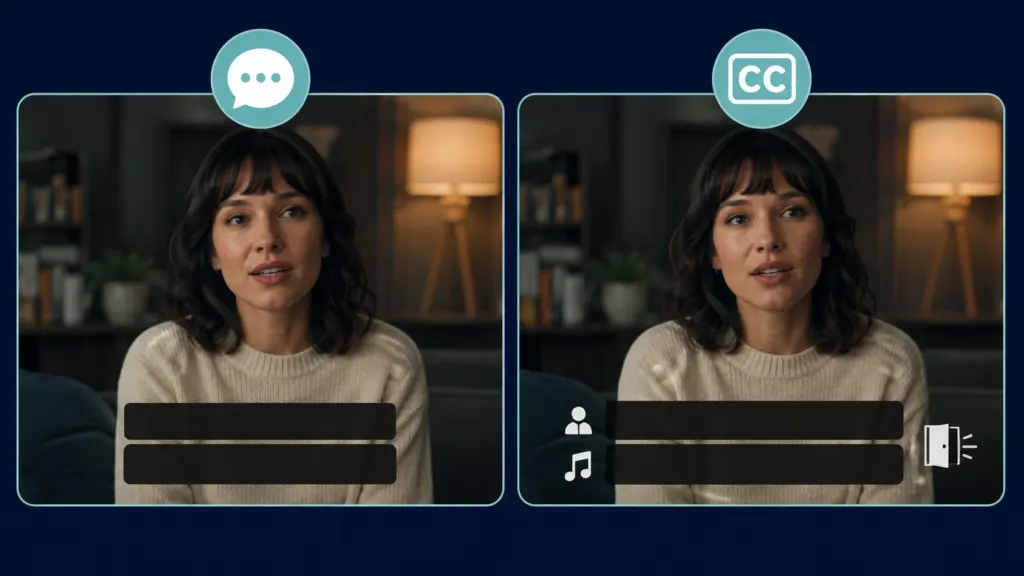
Subtitles and closed captions both display timed text over a video, but they do not always serve the same audience or include the same information.
Subtitles usually communicate spoken dialogue, often as a translation for viewers who can hear the soundtrack but do not understand its language. Closed captions support viewers who cannot fully hear the audio. They include dialogue plus meaningful sounds, music cues, and speaker identification.
The terminology changes across countries and platforms, which can make the difference less obvious. This guide explains subtitles vs closed captions, their accessibility roles, common labels, and how to choose the right option for your content.
The Main Difference Between Subtitles and Closed Captions
The simplest distinction involves the intended audience:
- Subtitles generally assume the viewer can hear the audio but needs written dialogue, often because the audio uses another language.
- Closed captions assume the viewer may not hear some or all of the audio, so they communicate dialogue and other meaningful sounds.
The World Wide Web Consortium uses captions for same-language accessibility text and subtitles for translated dialogue. It also notes that terminology varies by region and that some countries use subtitles for both purposes.
| Feature | Subtitles | Closed captions |
|---|---|---|
| Primary purpose | Translate or display dialogue | Make audio information accessible |
| Typical audience | Viewers who can hear but may not understand the language | Deaf and hard of hearing viewers |
| Spoken dialogue | Included | Included |
| Speaker identification | Usually omitted | Included when needed |
| Meaningful sound effects | Usually omitted | Included |
| Music information | Usually omitted | Included when relevant |
| Can viewers switch them off? | Usually, depending on the platform | Yes |
| Same language as the audio | Sometimes | Usually |
| Translated language | Common | Possible, but not essential to the definition |
These are general conventions, not universal rules. A subtitle track can include accessibility information, and some services call all timed text subtitles.
What Are Subtitles?
Subtitles are synchronized lines of text that represent spoken dialogue in a video. They commonly translate dialogue from the original language into a language the viewer understands.
For example, an English speaker watching a Korean film might choose English subtitles. Those subtitles would usually translate the spoken Korean dialogue without describing every audible detail.
A conventional subtitle track may include:
- Translated dialogue
- Written narration
- Relevant onscreen text
- Translations of signs or messages
- Limited speaker clarification when the speaker is unclear
Subtitles generally assume that viewers can hear tone of voice, music, laughter, alarms, doors closing, and other sounds. As a result, they may not provide equal access for someone who cannot hear the soundtrack.
W3C describes translated subtitles as interlingual subtitles. It describes same-language subtitles as intralingual subtitles, although many accessibility resources call the same-language version captions.
What Are Closed Captions?
Closed captions provide a synchronized text version of the audio information needed to understand a video. Viewers can normally turn the caption track on or off through the video player, television, or streaming application.
Closed captions may communicate:
- Spoken dialogue
- The identity of an offscreen or unclear speaker
- Meaningful sound effects
- Relevant music
- Changes in tone or delivery
- Laughter, cheering, or audience reactions
- Announcements and narration
- Important audio that occurs outside the frame
The Federal Communications Commission defines closed captioning as the visual display of the audio portion of television programming. Its purpose is to give people who are deaf or hard of hearing access to that programming. Federal Communications Commission
The Described and Captioned Media Program also explains that captions cover dialogue, speaker identification, sound effects, and music descriptions.
What Does Closed Mean in Closed Captions?
Closed means the viewer can activate or deactivate the captions.
A compatible video player receives a separate caption track and displays it when selected. The captions are not permanently visible inside the video image.
A CC icon commonly identifies this option, although menus and labels differ between devices and streaming services.
Closed does not mean hidden, private, or inaccessible. It refers only to the viewer’s ability to control whether the text appears.
How Closed Captions Represent More Than Speech
Dialogue alone does not communicate everything a hearing viewer receives from a soundtrack. A phone ringing, a character whispering, or tense music can change the meaning of a scene.
Good closed captions include these details when they contribute to understanding.
Examples written without formal caption syntax include:
- A phone rings in the next room.
- Elena whispers that someone is outside.
- Tense music grows louder.
- The audience laughs.
- Glass breaks behind the speaker.
- The announcer speaks over the stadium noise.
- A warning alarm begins.
- Sam calls from outside the frame.
Not every background sound needs a description. Captioners should prioritize sounds that affect meaning, identify an action, create a necessary emotional cue, or explain a character’s reaction.
DCMP advises captioners to include sound effects when they support the understanding or enjoyment of the media.
A Simple Example of Subtitles vs Closed Captions

Imagine a scene in which Maya enters a dark house. A window breaks upstairs, and an unseen person quietly calls her name.
A standard translated subtitle might show:
- Maya, come upstairs.
A closed caption track would provide more context:
- A window breaks upstairs.
- An unseen person whispers Maya’s name.
- Suspenseful music begins.
- Maya asks who is there.
The subtitle communicates the spoken words. The closed captions communicate the audio experience needed to follow the entire scene.
Closed Captions vs Open Captions
a-Closed captions are not the same as open captions.
Closed captions
- Viewers can turn them on or off.
- They usually exist as a separate timed text track.
- Supported players may allow changes to size, color, font, or background.
- They require compatible playback technology.
Open captions
- They remain visible for every viewer.
- Creators place them directly into the video image.
- Viewers cannot switch them off.
- They appear even when the player does not support a separate caption file.
- Their appearance usually cannot be customized by the viewer.
W3C recognizes both open and closed captions as captioning approaches. Closed captions depend on a player that supports them, while open captions remain part of the video itself. W3C Technique G87
Open captions often work well for public displays, social videos watched without sound, and platforms where caption controls may be unavailable. Closed captions offer more viewer control and keep the video image clear for people who do not need visible text.
What Are SDH Subtitles?
SDH means subtitles for the Deaf and hard of hearing.
An SDH track combines subtitle conventions with accessibility information. It can include:
- Dialogue
- Speaker names
- Offscreen voices
- Sound effects
- Music descriptions
- Other important non-speech audio
SDH often appears in streaming menus when a service offers several language tracks. An English track may contain dialogue only, while an English SDH track includes dialogue and essential audio descriptions.
DCMP explains that SDH includes speaker identification, sound effects, and other essential non-speech features, generally presented as close to verbatim as possible.
SDH and closed captions overlap closely. The label often reflects the platform, production workflow, or regional convention rather than a completely different accessibility function.
Captions, Subtitles, and Regional Terminology
The vocabulary is not consistent worldwide.
In the United States and Canada, caption commonly refers to accessibility text that includes both speech and meaningful sounds. Subtitle often refers to translated dialogue.
In other regions, subtitle may cover both translated and same-language accessibility text. A service might use terms such as subtitles for the deaf and hard of hearing instead of closed captions.
W3C explicitly recognizes this variation. It notes that some regions use subtitles for both same-language and translated text.
Because labels vary, creators should examine what a track actually contains. A track that includes dialogue, speaker identification, and important sounds can provide caption-level information even when a platform calls it subtitles.
Why Closed Captions Matter for Accessibility
Closed captions give Deaf and hard of hearing viewers access to information delivered through audio.
They can also help people who:
- Watch videos in noisy environments
- Need to keep their device silent
- Process written language more easily than speech
- Find an accent difficult to understand
- Are learning the language used in the video
- Need support with unfamiliar names or technical vocabulary
- Miss dialogue because of poor recording quality
W3C states that captions serve Deaf and hard of hearing users as well as people who process written information better than audio. W3C Web Accessibility Initiative
Captions should not be treated only as an optional convenience. For many viewers, they provide access to information that would otherwise remain unavailable.
Subtitles vs Closed Captions Under WCAG
The Web Content Accessibility Guidelines address captions for synchronized media.
Under WCAG 2.2:
- Success Criterion 1.2.2 requires captions for prerecorded audio in synchronized media at Level A, apart from a stated exception for media that serves as a text alternative.
- Success Criterion 1.2.4 requires captions for live audio in synchronized media at Level AA.
These requirements focus on captions that provide access to audio, not dialogue-only translations created for hearing viewers.
Legal requirements can vary by country, industry, platform, and type of content. WCAG is an accessibility standard, but whether a specific law requires conformance depends on the applicable jurisdiction and situation. Content owners should obtain qualified legal advice when they need a formal compliance assessment.
Closed Captions vs Transcripts
Captions and transcripts both convert audio into text, but people use them differently.
Closed captions:
- Appear while the video plays
- Synchronize with the audio
- Divide information into timed segments
- Support viewers as they watch
- Can identify speakers and meaningful sounds
Transcripts:
- Present the content as a separate document or webpage
- Do not need to appear at the exact time of the audio
- Make scanning and searching easier
- May include headings, links, and additional formatting
- Should describe important visual information when serving as a full media alternative
W3C explains that captions are written for use alongside the visible video. A transcript may need additional descriptions of onscreen text and important visual information.
A transcript does not automatically replace synchronized captions. Providing both can serve different needs.
Closed Captions vs Audio Description
Closed captions translate meaningful audio into written information. Audio description translates meaningful visual information into spoken information.
Audio description may explain:
- Actions
- Facial expressions
- Locations
- Scene changes
- Costumes
- Important onscreen text
- Visual details that the main soundtrack does not communicate
W3C states that audio description gives blind and visually impaired viewers access to important visual information through synchronized narration.
Neither feature replaces the other. Captions primarily address access to sound, while audio description primarily addresses access to visuals.
Which Option Should You Use?
Choose the format based on the audience and the information they need.
1-Use standard subtitles when:
- You are translating dialogue into another language.
- Your viewers can hear the original soundtrack.
- The translated words provide enough information for the intended purpose.
- You already offer a separate accessibility track.
2-Use closed captions when:
- You want Deaf and hard of hearing viewers to understand the audio.
- The video contains meaningful sounds beyond speech.
- Viewers need speaker identification.
- You want users to control whether text appears.
- Your website or application supports selectable timed text tracks.
3-Use SDH when:
- You need translated or same-language subtitles with accessibility details.
- Your streaming platform recognizes SDH as a track label.
- Viewers need dialogue, sound descriptions, and speaker information.
4-Use open captions when:
- The text must remain visible for everyone.
- The video will play on public screens.
- The platform may not support optional caption tracks.
- Many viewers will watch muted social media content.
- You need the captions to retain the same visual treatment everywhere.
Some projects benefit from more than one track. A film might offer English closed captions, English SDH, and translated subtitles in several languages.
How to Create Useful Closed Captions
High-quality captions require more than an automatically generated transcript.
Include every meaningful spoken line
Preserve the speaker’s meaning, important wording, and relevant tone. Avoid removing content merely to shorten the track.
Identify speakers when the image does not
Tell viewers who speaks when they cannot work it out visually. This matters during offscreen dialogue, group discussions, phone calls, and rapid speaker changes.
Describe sounds that affect understanding
Include alarms, breaking objects, music changes, laughter, applause, and other audio cues when they contribute to the scene.
Synchronize text with the audio
Captions should appear as the corresponding words and sounds occur. Poor timing can reveal information too early, delay a joke, or make a conversation difficult to follow.
Keep the text readable
Use sensible line lengths, natural phrase breaks, sufficient contrast, and a position that does not hide important visual information.
Review automatic captions
W3C warns that automatic captions often require editing because they may misrepresent names, technical language, punctuation, and meaning. Human review remains necessary when accuracy matters.
Common Captioning Mistakes to Avoid
Calling dialogue-only text accessible captions
A same-language transcript may capture the spoken words but still omit music, speaker changes, and essential sounds.
Leaving automatic output unedited
Speech recognition can misunderstand accents, names, overlapping speech, and specialized terminology.
Describing every minor sound
Too much detail can distract from the main content. Include sounds that help viewers understand the action, tone, or narrative.
Using unclear speaker labels
Generic labels become confusing when several people speak. Use names or meaningful descriptions when the audience can reasonably know them.
Allowing captions to block key visuals
Do not cover faces, demonstrations, labels, names, or other information that viewers need.
Displaying text too early or too late
Timing affects comprehension and can spoil dramatic or instructional moments.
Assuming subtitles and captions always mean the same thing
Terminology varies, but content still matters. Check whether the track includes non-speech audio and speaker identification.
Final Difference Between Subtitles and Closed Captions
The core difference between subtitles vs closed captions lies in the information they communicate.
Subtitles generally focus on spoken dialogue, particularly translated dialogue. Closed captions communicate the meaningful audio experience, including speech, speaker identity, music, and important sounds.
If your goal is language translation, subtitles may meet the need. If your goal is accessible video, choose accurate closed captions or an SDH track that provides equivalent audio information.
Frequently Asked Questions
Are subtitles and closed captions the same?
Not always. Subtitles often show or translate dialogue for viewers who can hear the soundtrack. Closed captions include dialogue and meaningful non-speech audio for viewers who may not hear it. Some countries and platforms use the terms interchangeably, so you should check what the track contains.
What does CC mean on a video?
CC usually means closed captions. Selecting the CC control turns a supported caption track on or off.
Do subtitles include sound effects?
Standard dialogue subtitles usually omit sound effects. SDH subtitles and accessibility-focused subtitle tracks include meaningful sound effects, music information, and speaker identification.
Why are closed captions called closed?
They are closed because viewers can switch them on or off. Open captions remain permanently visible in the video.
Are closed captions always in the same language as the audio?
They commonly use the same language, but translated accessibility tracks can also include caption information. The essential feature is their representation of meaningful audio, not language alone.
Are subtitles useful for Deaf and hard of hearing viewers?
Dialogue subtitles provide some information, but they may omit sounds and speaker cues. Closed captions or SDH usually provide more complete access.
Do closed captions include every background noise?
No. They should include sounds that contribute to meaning, context, emotion, or the viewer’s understanding of an event.
Can automatic captions meet accessibility needs?
Automatic captioning can provide a starting point, but errors may affect meaning and comprehension. Review and correct the output before treating it as a reliable accessibility track.
Is a transcript enough instead of captions?
Usually not for synchronized video. A transcript presents information separately, while captions appear with the relevant moments in the video. Each format serves a different use case.
Should social media videos use open or closed captions?
Either can work. Open captions guarantee that the words remain visible, while closed captions give viewers control and may support personal display preferences. Offering an accurate closed caption track is the stronger accessibility option when the platform supports it.
1 thought on “Subtitles vs Closed Captions: Meaning, Differences, and Accessibility”