
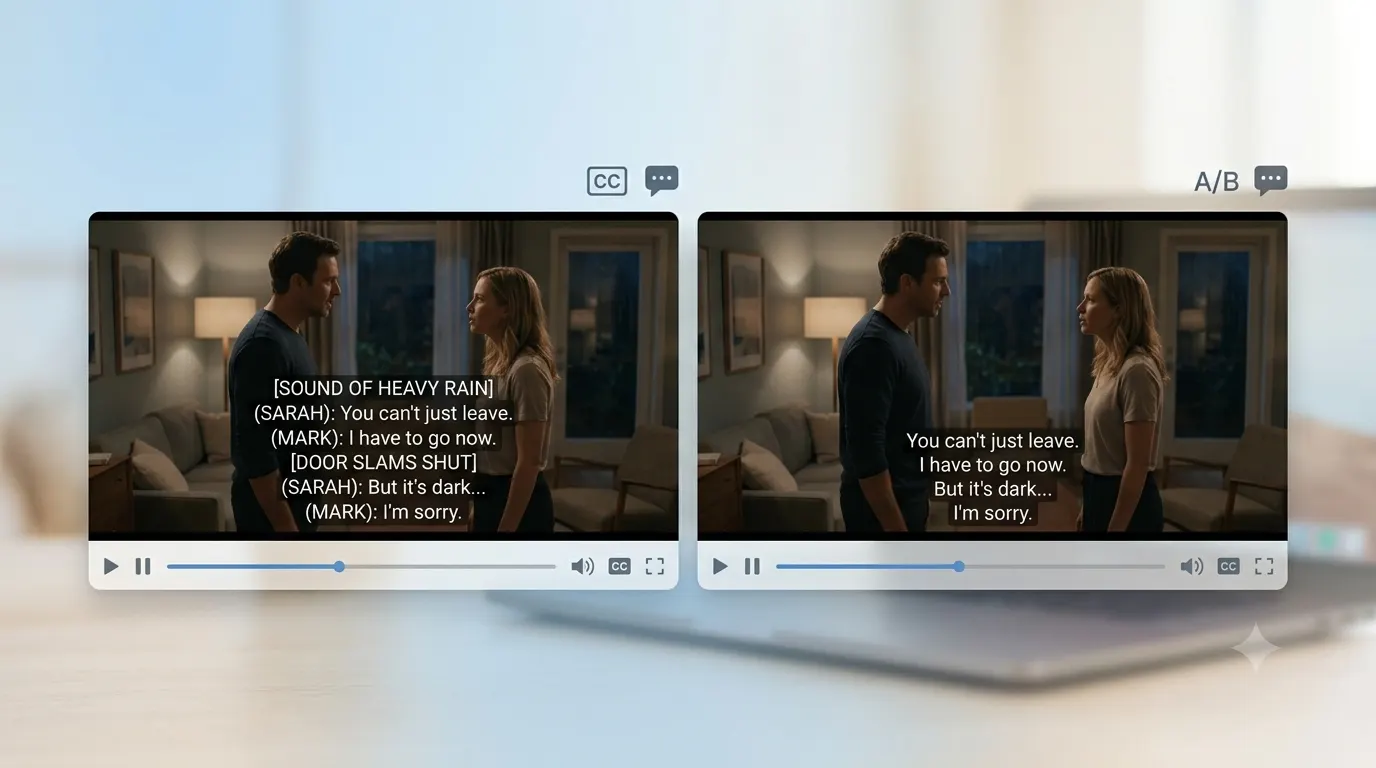
If you’ve ever watched a movie on Netflix, YouTube, or TV, you’ve probably seen options for both closed captions and subtitles. Many people think they mean the same thing, but they serve different purposes. The short answer is simple. Subtitles translate or display spoken dialogue, while closed captions include dialogue plus important non speech audio information such as music, sound effects, and speaker identification. Understanding the difference helps you choose the right option for accessibility, language learning, content creation, streaming, education, and business videos.
Closed Captions vs Subtitles, Quick Answer
Here’s the easiest way to remember it.
| Feature | Closed Captions | Subtitles |
|---|---|---|
| Spoken dialogue | Yes | Yes |
| Sound effects | Yes | No, usually |
| Music descriptions | Yes | Rarely |
| Speaker identification | Yes | Sometimes |
| Accessibility focused | Yes | No |
| Language translation | Sometimes | Often |
| Can be turned on or off | Yes | Usually yes |
If your goal is accessibility for viewers who are deaf or hard of hearing, choose closed captions.
If your goal is helping viewers understand another language, choose subtitles.
What Are Closed Captions?
Closed captions are a text version of everything important happening in a video.
They include:
- Spoken dialogue
- Speaker names when needed
- Meaningful sound effects
- Background noises
- Music descriptions
- Emotional audio cues when relevant
For example:
- Sarah: I’ll meet you at eight.
- Thunder rumbles outside.
- Gentle piano music begins.
- Door closes softly.
- Audience laughs.
Notice that the captions describe sounds that someone cannot hear. This makes the content accessible to people who are deaf or hard of hearing.
What Are Subtitles?
Subtitles mainly display the words that people speak.
Their primary purpose is helping viewers understand dialogue when:
- The language is unfamiliar.
- The accents are difficult.
- The audio quality is poor.
- Someone wants to watch without sound.
A subtitle example might simply read:
- I’ll meet you at eight.
Unlike captions, subtitles usually do not explain background sounds unless they are essential to understanding the story.
The Biggest Difference Between Closed Captions and Subtitles
The easiest distinction is this:
Closed captions tell you what people say and what you should hear.
Subtitles mainly tell you what people say.
Imagine a horror movie.
A subtitle may display:
- Don’t look behind you!
A closed caption may display:
- Don’t look behind you!
- Slow footsteps approach.
- Window shatters.
- Dramatic music intensifies.
The additional information creates a complete experience for viewers who cannot hear the soundtrack.
Why Closed Captions Matter
Closed captions do much more than improve accessibility.
They also help:
- People watching without sound.
- Viewers in noisy places.
- Students learning online.
- Employees watching training videos.
- Language learners.
- Older adults.
- People with temporary hearing loss.
- Mobile users on public transportation.
Many social media users watch videos with muted audio, making captions valuable even for viewers with perfect hearing.
Why Subtitles Are Still Important
Subtitles remain useful in many situations.
They work well when:
- Watching foreign films.
- Learning a second language.
- Understanding strong accents.
- Watching videos quietly.
- Following fast dialogue.
Many streaming platforms allow viewers to choose subtitles in multiple languages, making content available to audiences around the world.
Open Captions vs Closed Captions
People often confuse these terms as well.
Closed Captions
- Users can turn them on or off.
- Stored as a separate caption track.
- Common on streaming services.
Open Captions
- Always visible.
- Permanently embedded into the video.
- Cannot be turned off.
Creators often use open captions for social media because many viewers watch videos without enabling caption settings.
Closed Captions vs SDH
Another common question is the difference between closed captions and SDH.
SDH stands for Subtitles for the Deaf and Hard of Hearing.
They look similar to closed captions because they include:
- Dialogue
- Speaker identification
- Important sound descriptions
The main distinction is that SDH is commonly used for translated content, while traditional closed captions are generally in the same language as the original audio.
Who Should Use Closed Captions?
Closed captions are ideal for:
- Educational institutions
- Government organizations
- Businesses
- Video marketers
- YouTube creators
- Online course creators
- Streaming platforms
- Healthcare organizations
- Public service announcements
They improve accessibility while also increasing audience engagement.
Who Should Use Subtitles?
Subtitles are often the better choice for:
- International audiences
- Language learners
- Foreign films
- Global businesses
- Travel content
- Multilingual YouTube channels
Many creators actually provide both captions and subtitles to serve different audiences.
When Should You Use Both?
Many professional videos include:
- Closed captions in the original language.
- Subtitles translated into several languages.
This combination provides the widest possible audience reach while maintaining accessibility.
Benefits of Closed Captions
Adding captions can improve the viewing experience in several ways.
Better Accessibility
Captions make videos usable for people with hearing disabilities.
Improved Understanding
Viewers can follow conversations more easily, especially in noisy environments.
Better Learning
Students retain information more effectively when they can both hear and read.
Increased Engagement
Many viewers continue watching longer when captions are available.
Easier Silent Viewing
Captions help people watch videos in offices, libraries, airports, and public transportation.
Benefits of Subtitles
Subtitles also offer valuable advantages.
Reach Global Audiences
Translate videos into multiple languages.
Help Language Learners
Reading spoken words improves vocabulary and pronunciation.
Understand Accents
Subtitles make unfamiliar accents easier to follow.
Enjoy Foreign Entertainment
International movies and television become more accessible.
Common Myths
Myth 1. Closed captions and subtitles are identical.
They are similar but serve different purposes.
Myth 2. Only people with hearing loss use captions.
Millions of viewers enable captions every day for convenience.
Myth 3. Captions hurt the viewing experience.
Many viewers find captions improve understanding and concentration.
Myth 4. Subtitles always translate dialogue.
Not always. They can also display dialogue in the same language.
How to Choose the Right Option
Ask yourself a few simple questions.
Do you want accessibility?
Choose closed captions.
Do you need language translation?
Choose subtitles.
Are you publishing educational content?
Closed captions are usually the better choice.
Are you distributing videos internationally?
Use subtitles alongside captions whenever possible.
Common Mistakes to Avoid
Many creators accidentally reduce accessibility by making these errors.
- Only captioning dialogue while ignoring important sounds.
- Forgetting speaker identification when multiple people talk.
- Using inaccurate automatic captions without reviewing them.
- Displaying captions too quickly to read comfortably.
- Covering important on screen visuals with caption placement.
- Assuming subtitles provide full accessibility.
- Leaving spelling or punctuation errors in captions.
- Ignoring background audio that affects the story.
Best Practices for Closed Captions
Follow these tips for professional quality captions.
- Keep captions synchronized with speech.
- Include meaningful sounds only.
- Use consistent speaker labels.
- Keep wording accurate.
- Break long sentences naturally.
- Avoid covering important visual elements.
- Review automatic captions before publishing.
- Maintain proper spelling and punctuation.
- Keep reading speed comfortable.
Final Thoughts
Understanding the difference between closed captions vs subtitles helps you create more inclusive and effective video content. Closed captions make videos accessible by describing both dialogue and meaningful audio, while subtitles focus mainly on spoken words and language translation. If your audience includes people with hearing loss, educational viewers, or users watching without sound, closed captions are the right choice. If you’re reaching multilingual audiences, subtitles add valuable language support. Using both whenever practical creates the best experience for the widest range of viewers.
Frequently Asked Questions
Are closed captions better than subtitles?
Neither is universally better. Closed captions are best for accessibility, while subtitles are better for translation and language support.
Do subtitles include sound effects?
Usually no. Most subtitles only display spoken dialogue.
Are closed captions legally required?
Requirements vary depending on country, platform, and organization. Many broadcasters, educational institutions, and public organizations must provide accessible captions.
Can YouTube generate closed captions automatically?
Yes. Automatic captions are available for many videos, but creators should review and correct them for accuracy.
Why do streaming services offer both captions and subtitles?
Because they serve different audiences. Captions support accessibility, while subtitles support multilingual viewing.
Can I watch videos with captions and subtitles together?
Some platforms allow multiple text tracks, while many require choosing one option at a time.
Are open captions the same as closed captions?
No. Open captions are permanently visible, while closed captions can be turned on or off.
Which is better for social media videos?
Open captions often perform well because many people watch videos without sound, but providing accessible caption files where supported is still recommended.
1 thought on “Closed Captions vs Subtitles, What’s the Difference and Which Should You Use?”